

search
Use this Reporting API to get aggregated campaign data in either JSON or CSV format.
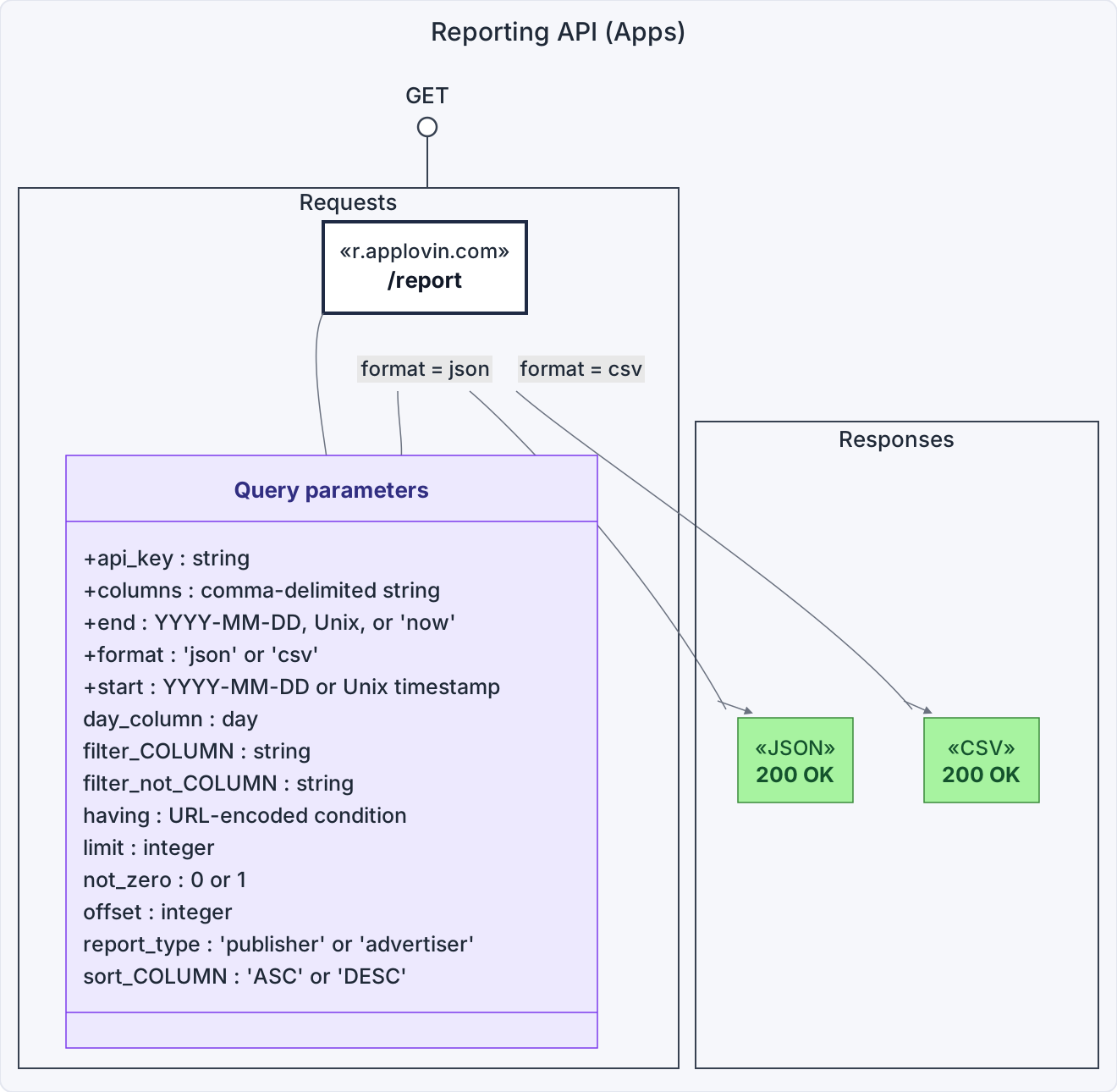
Make report requests by sending HTTP GET requests to the following base URL: https://r.applovin.com/report
| Parameters | Purpose |
|---|---|
api_key | Your Report Key You can find your Report Key on the AppLovin dashboard by clicking your account in the top right of the dashboard and selecting Keys. |
start1 | The start date of the report Accepts a date in «YYYY-MM-DD» format or a Unix timestamp. For example, 2012-10-05 or 1336608000. |
end1 | The end date of the report Accepts a date in «YYYY-MM-DD» format or a Unix timestamp. For example, 2012-10-05 or 1336608000 or now. |
format | The format for the report Accepts json or csv. See details on request format below. |
columns | A comma-separated list of columns for the report See the allowed columns below. For example, day,campaign. |
report_type | Tells the API to respond with publisher or advertiser dataIf you omit this parameter, the API defaults to report_type=publisher. |
1This API has a request window of 45 days. Make sure the date parameters are in the last 45 days.
| Parameters | Purpose |
|---|---|
day_column | Metrics are realtime by default; set this to day when you want to pull metrics under cohort. |
limit | The limit on the number of rows you want to return; for example, 500 (use limit and offset to paginate results) |
offset | The offset at which you want to begin fetching rows; for example, 100 (use limit and offset to paginate results) |
having | Allows you to filter the results based on numeric values This parameter accepts URL-encoded values of numeric columns, comparison operators, and logical operators, for example: impressions%20%3E%200%20AND%20revenue%20%3E%200 (“impressions > 0 AND revenue > 0”).Note: This slows the response and increases the likelihood of timeouts. |
not_zero | Set this to 1 to filter out results in which all numerical metrics have a value of 0. |
| Column name | Contains |
|---|---|
ad_type | APPOPEN, GRAPHIC, MRAID, PLAY, REWARD, or VIDEO |
application | App name |
application_is_hidden | Is the app hidden in the dashboard? |
bidding_integration | The mediation provider that AppLovin bids through (MAX for MAX mediation, Google for AdMob Mediation Open Bidding or Google Ad Manager/GAM, None for non-bidding/zone integrations) |
clicks | Number of clicks |
country | Two-letter country code |
ctr | Number of clicks ÷ number of impressions |
day | Date of reporting data |
device_type | phone, tablet, or other |
ecpm | Money earned per 1000 impressions |
hour | Hour of reporting data (only available for the past 30 days) |
impressions | Number of impressions |
package_name | App’s package name or bundle ID |
placement_type | APP_OPEN, BANNER, INTER, LEADER, MREC, NATIVE, or REWARDED_INTER |
platform | android, fireos, ios |
revenue | Money earned |
size | Ad size (BANNER, INTER, LEADER, MREC, or NATIVE) |
store_id | The numeric part of the iTunes ID on iOS, or the package_name on Android.If the iTunes ID is not known to AppLovin, the Bundle ID instead |
zone | Zone name, if available to your account |
zone_id | Zone ID, if available to your account Please contact your account manager if you want to use Zones. |
| Column name | Contains |
|---|---|
ad | Ad name |
ad_creative_type | GRAPHIC, PLAYABLE, VIDEO, VIDEO_GRAPHIC, or VIDEO_PLAYABLE |
ad_rev_«x» | Ad revenue during a particular time span («x» is one of 0d, 1d, 2d, 3d, 7d, 14d, 28d, 30d, 90d, or 1y) |
ad_roas_«x» | Return on ad spend during a particular time span («x» is one of 0d, 1d, 2d, 3d, 7d, 14d, 28d, 30d, 90d, or 1y) |
ad_type | APPOPEN, GRAPHIC, PLAY, REWARD, or VIDEO |
app_id_external | Hashed application ID (commonly referred to as “site ID”) |
application | Source application name |
average_cpa | Average cost per conversion |
average_cpc | Average cost per click |
bidding_and_billing_method | The bidding strategy, either AUTO_BIDDING_WITH_CPM_BILLING, CAPPED_GOAL_BIDDING_WITH_CPM_BILLING, FIXED_GOAL_BIDDING_WITH_CPI_BILLING, or FIXED_GOAL_BIDDING_WITH_CPM_BILLING |
campaign | Campaign name |
campaign_ad_type | ua for user acquisition, or rt for retargeting |
campaign_bid_goal | The campaign bid goal, expressed as a dollar value ($), for CPP and CPE campaigns. You must also request the campaign column when you request this one. |
campaign_id_external | Unique reference to a campaign. This doesn’t change when the campaign is renamed. It is the same value as the {CAMPAIGN_ID} click macro. |
campaign_package_name | Package name or Bundle ID of the promoted app |
campaign_roas_goal | The return on ad spend (ROAS) goal, expressed as a percentage value (%), for IAP ROAS, Ad ROAS, and ROAS campaigns. You must also request the campaign column when you request this one. |
campaign_store_id | The numeric part of the iTunes ID of the promoted app on iOS, or the camaign_package_name otherwise |
campaign_type | The campaign optimization type (CPP, CPE, ad ROAS, IAP ROAS, or ROAS) |
clicks | Number of clicks |
conversions | Number of conversions (installs) |
conversion_rate | Number of conversions ÷ number of impressions |
cost | Advertiser spend |
cost_per_target_event_«x» | Target event cost-per-event during a particular time span («x» is one of 0d, 1d, 2d, 3d, 7d, 14d, 30d, 90d, or 1y) |
country | Two-letter country code |
cpp_«x» | Cost per purchase during a particular time span («x» is one of 0d, 1d, 2d, 3d, 7d, 14d, 30d, 90d, or 1y) |
creative_set | Creative set name |
creative_set_id | Creative set ID. This does not change if the creative set name changes. |
ctr | Number of clicks ÷ number of impressions |
custom_page_id | The iOS Custom Product Page or Android Store Listing associated with the creative set |
day | Date of reporting data |
device_type | phone, tablet, or other |
external_placement_id | Encrypted application ID |
optimization_day_target | Which optimization day you chose to target for the campaign (e.g. day 0 or day 7) |
placement_type | APP_OPEN, BANNER, CTV, INTER, LEADER, MREC, NATIVE, or REWARDED_INTER |
platform | android, fireos, ios, or tvos |
ret_«x» | Retention during a particular time span («x» is one of 1d, 3d, 7d, 14d, or 28d) |
roas_«x» | Total ROAS during a particular time span («x» is one of 0d, 1d, 2d, 3d, 7d, 14d, 28d, 30d, 90d, or 1y) |
sales | Count of attributed sales events (requires revenue postbacks) |
sales_«x» | Sales during a particular time span («x» is one of 0d, 1d, 2d, 3d, 7d, 14d, 30d, 90d, or 1y) |
size | Ad size (BANNER, INTER, LEADER, MREC, NATIVE, or PRELOAD) |
target_event | The custom event the campaign targets (applies to CPE campaigns only) |
target_event_count | Unique target events |
target_event_count_«x» | Unique target events during a particular time span («x» is one of 0d, 1d, 2d, 3d, 7d, 14d, 30d, 90d, or 1y) |
total_rev_«x» | Total revenue during a particular time span («x» is one of 0d, 1d, 2d, 3d, 7d, 14d, 28d, 30d, 90d, or 1y) |
traffic_source | AppLovin, or the name of the exchange |
unique_purchasers_«x» | Unique purchasers during a particular time span («x» is one of 0d, 1d, 2d, 3d, 7d, 14d, 28d, 30d, 90d, or 1y) |
You can filter reports by any column. When you do so, you search for a direct match to any of the filters.
To filter by a column, add the following URL parameter: filter_«columnname»=«onefilter,anotherfilter,thirdfilter»
For example, if you want to see data only for the Android platform, set the following URL parameter: filter_platform=Android
See the table above for a list of all columns.
Some columns support negative filters via filter_not_«columnname»=«onefilter,anotherfilter».
The custom_page_id dimension also supports filter_null_custom_page_id, filter_blank_custom_page_id, filter_not_null_custom_page_id, and filter_not_blank_custom_page_id options.
These options do not require a value, i.e. …&filter_not_null_custom_page_id=&filter_not_blank_custom_page_id=&…
You sort reports in a similar way to how you filter reports.
For example, to sort a report by campaign, add the following URL parameter: sort_campaign=ASC
The accepted values are ASC for ascending or DESC for descending.
All sorts are lexicographical sort.
You can request reports in two formats: JSON or CSV.
All data in the reporting API is in UTC (Coordinated Universal Time).
Example advertiser request:
https://r.applovin.com/report?api_key=«your-report-key»&start=2015-04-20&end=now&columns=day,campaign,impressions,clicks,ctr,conversions,conversion_rate,app_id_external,cost,sales&format=json&report_type=advertiser
Example publisher request:
https://r.applovin.com/report?api_key=«your-report-key»&start=2016-07-01&end=2016-07-07&columns=day%2Cplatform%2Ccountry%2Capplication%2Cpackage_name%2Csize%2Cad_type%2Cimpressions%2Cclicks%2Crevenue,device_type&having=impressions%20%3E%200%20AND%20revenue%20%3E%200&format=csv
 Cookie Settings